
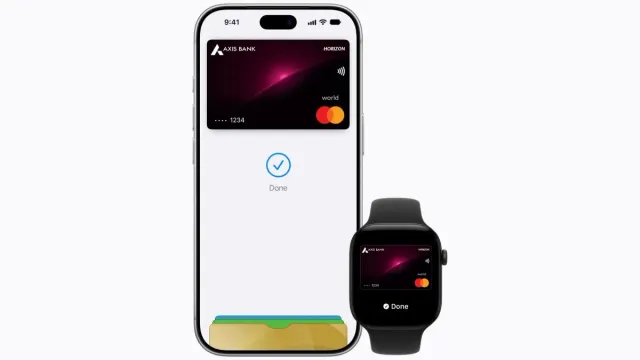
Users in India with compatible iPhones, Apple Watches and iPads can now use Apple Pay for eligible purchases. During the initial rollout, Apple is working with Axis Bank, meaning only certain eligible Visa and Mastercard credit cards issued by the bank can currently be added to Apple Wallet.
The arrival of Apple Pay in India comes years after Apple originally introduced the service in the United States. Apple Pay was first launched in 2014 and has since expanded to numerous markets around the world.
What Is Apple Pay and How Does It Work?
Apple Pay is Apple’s digital payment system that allows users to make purchases using compatible Apple devices instead of presenting a physical bank card.
After an eligible card has been added to Apple Wallet, users can use an iPhone or Apple Watch to pay at stores equipped with compatible NFC contactless payment terminals.
The process is similar to other contactless payment systems. The customer authenticates the transaction on the device and brings it close to the payment terminal to complete the purchase.
Apple Pay in India: Which Cards Are Supported?
Card availability is one of the most important limitations of the initial Apple Pay launch in India. The service currently supports eligible Visa and Mastercard credit cards issued by Axis Bank.
This means customers with cards from other banks may have to wait until their financial institutions establish support for Apple Pay.
| Feature | Initial Availability |
|---|---|
| Participating bank | Axis Bank |
| Card type | Eligible credit cards |
| Supported networks | Visa and Mastercard |
| Contactless payments | Yes, through NFC |
| Apple Wallet | Supported |
| Online payments | Available at supported merchants and apps |
Support could expand in the future as Apple adds more banks, card issuers and payment products to its platform in India.
Which Apple Devices Support Apple Pay?
Apple Pay can be used on compatible models of iPhone, iPad and Apple Watch. Exact compatibility depends on the device model and its software version.
Apple has also indicated that Mac support will be added, giving users another way to use Apple Pay for supported purchases.
Compatible Apple devices
- Compatible iPhone models.
- Compatible Apple Watch models.
- Compatible iPad models for supported purchases.
- Mac support is expected to be added.
How to Pay With Apple Pay at a Store
For in-store payments, the retailer needs a point-of-sale terminal that supports NFC and contactless payments.
Once an eligible card has been added to Apple Wallet, making a payment only takes a few steps.
- Check that the store accepts contactless payments.
- Open Apple Wallet or use the device’s configured payment shortcut.
- Select the card you want to use.
- Authenticate the payment using the device’s security method.
- Hold your iPhone or Apple Watch near the NFC payment terminal.
- Wait for the payment confirmation.
One of the advantages of Apple Pay is that users do not have to hand their physical card to a cashier. The card does not need to be inserted into the payment terminal when using contactless Apple Pay.
Apple Pay Can Also Be Used for Online Purchases
Apple Pay is not limited to physical stores. On supported websites and applications, users can select Apple Pay as a payment method during checkout.
This can eliminate the need to manually type a card number, expiration date and other payment information when completing an eligible purchase.
Online and in-app availability depends on whether the merchant or application has enabled Apple Pay as a payment option.
Is Apple Pay Safe to Use?
Security is one of the key features of Apple’s payment system. Apple says the actual card number is not stored directly on the device or on its servers as part of the Apple Pay payment process.
Instead, Apple creates a Device Account Number associated with the payment card and device. This identifier is used during transactions instead of exposing the actual card number.
The Device Account Number is stored in the device’s Secure Element, a dedicated security component designed to protect sensitive payment information.
Does the merchant receive my card number?
According to Apple, the merchant does not receive the user’s actual card number when a payment is made through Apple Pay. Instead, the system uses device-specific payment credentials to process the transaction.
Does Apple Store Your Purchase History?
Apple also states that it does not retain transaction details in a way that allows the company to reconstruct a user’s complete purchase history.
Information associated with a transaction can remain with the parties involved in the payment, such as the customer, merchant and card issuer or bank.
As with any digital payment service, users should also review the privacy and security policies of their bank and the merchants they use.
How to Set Up Apple Pay in India
Axis Bank customers with an eligible credit card can begin setting up Apple Pay through the bank’s application or directly through Apple Wallet.
Set Up Apple Pay Through Apple Wallet
- Open the Wallet app on your compatible iPhone.
- Tap the + button to add a new card.
- Follow the instructions displayed on the screen.
- Enter or scan your card information.
- Complete the verification process requested by the bank.
- Once approved, the card will be available for Apple Pay payments.
Depending on the card and bank, customers may also be able to begin the activation process through the Axis Bank app.
What If My Card Is Not Supported?
If a credit card cannot be added to Apple Wallet, it does not necessarily mean there is a problem with the iPhone. The card issuer, card type or payment network may simply not support Apple Pay in India yet.
Users should check the following:
- Whether the card is an eligible credit card.
- Whether it belongs to a supported payment network.
- Whether it was issued by a participating bank.
- Whether the Apple device is compatible.
- Whether the device software is up to date.
Apple Pay vs. Traditional Card Payments
The main difference between Apple Pay and a traditional physical card is how the payment is authenticated and processed.
With Apple Pay, users can pay using a device they already carry, such as an iPhone or Apple Watch, while authenticating the transaction directly on the device.
The merchant also does not need to receive the customer’s complete card number to process an Apple Pay transaction.
| Feature | Physical Card | Apple Pay |
|---|---|---|
| Physical card required | Yes | No |
| NFC payments | Supported by contactless cards | Yes |
| Device authentication | Not necessarily | Yes |
| Actual card number shared with merchant | May be used | Device-specific credentials are used |
| In-app payments | Depends on merchant | Supported where available |
When Will Apple Pay Support More Banks in India?
The initial Axis Bank launch does not necessarily mean Apple Pay will remain limited to one financial institution. Apple’s payment service relies on agreements with banks, card issuers and payment networks.
As a result, support for additional Indian banks will depend on future partnerships and technical integration.
Customers who currently use another bank should check Apple Wallet and their bank’s official announcements for updates regarding Apple Pay compatibility.
Why Is Apple Pay’s India Launch Important?
India is one of the world’s largest smartphone and digital services markets. The arrival of Apple Pay gives Apple users another option for making contactless payments with their devices.
For Apple, the launch also expands the reach of its payments ecosystem into an important international market.
The ability to pay with an iPhone or Apple Watch could be particularly useful for customers who already rely on Apple’s ecosystem for communication, shopping and other everyday digital services.
Frequently Asked Questions About Apple Pay in India
Final Thoughts
Apple Pay in India gives eligible Apple users a new way to make contactless payments using devices such as the iPhone and Apple Watch.
However, the initial rollout has an important limitation: only eligible Visa and Mastercard credit cards issued by Axis Bank are currently supported. The addition of more banks and cards will be an important factor in determining how broadly Apple Pay can be used across India.
For customers who already have a compatible Axis Bank card, adding the card to Apple Wallet provides a convenient way to make supported payments while taking advantage of Apple’s device-based security features.
Note: Apple Pay availability, supported cards, banks, devices and features may change over time. Users should check Apple and their bank for the latest compatibility information.